


Chilis
4.312.89K Reviews
App Specs
- Version
- 9.1.4
- Updated On
- License
- Free
- Downloads
- 5,000,000+
- Developer
- Brinker International
- Categories
- Lifestyle
- Platform
- Android, iOS
Screenshots

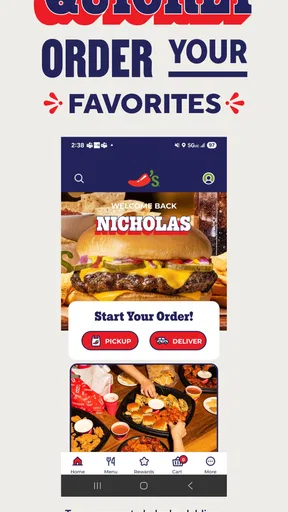
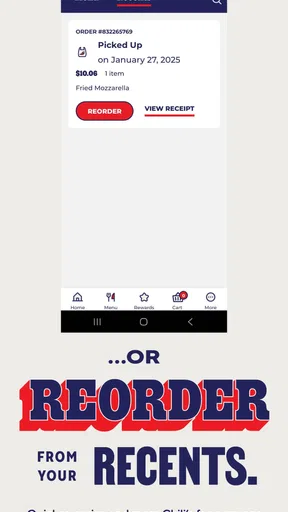
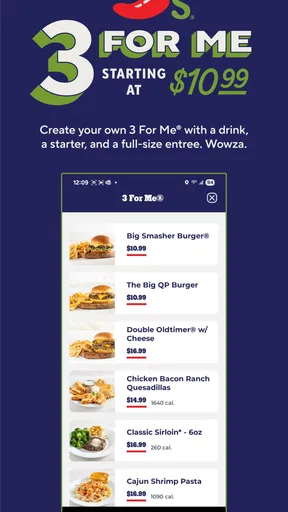
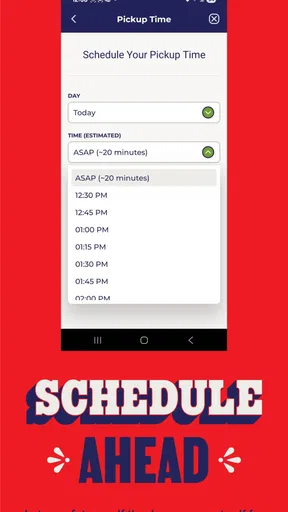

 Analysis by AppCompare
When I want to arrange a quick meal without turning dinner into a planning project, a restaurant’s own app can be useful—but only if it makes the basics easy and lets me understand what I’m doing. Chilis is a free lifestyle app from Brinker International, built around finding a nearby Chili’s, looking through its menu, and placing a pickup or delivery order. I’d think of it as a practical ordering companion rather than a general dining guide: its value depends on whether Chili’s is already an option you’re considering.
A focused tool, not a restaurant directory
That distinction matters when deciding whether to install it. A map app or a broad restaurant platform is usually better when I’m comparing many nearby places, cuisines, or delivery providers. This app makes more sense after I’ve settled on Chili’s and want to check the menu or organize an order. Keeping the task narrow can save steps, but it also means the app is less useful if I want to explore independent restaurants or compare menus across chains.
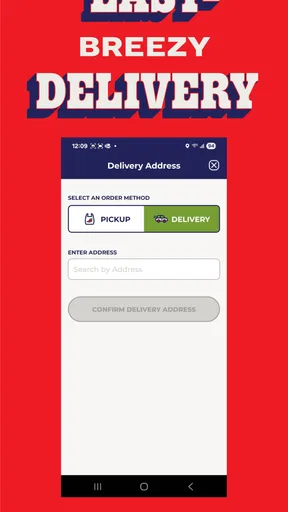
I’d use the location search before heading out, especially if I’m unfamiliar with the area. Finding a restaurant first gives me a chance to check that there’s a convenient Chili’s nearby rather than building plans around an assumed location. For delivery, I’d treat the restaurant and delivery address as the first checks; for pickup, I’d confirm which location I’m ordering from before moving through the menu. Those small checks help avoid the common mistake of preparing an order for the wrong place.
Useful when a meal has several moving parts
The strongest everyday use case is a meal that needs coordinating but not a lot of discussion. Imagine I’m leaving work and someone at home asks me to pick up dinner. I can look over the menu, decide what suits the group, and place the order for pickup rather than calling while commuting. If delivery is the better fit, the same basic flow keeps the menu and ordering task together. I’d still review the final order carefully before submitting it, particularly when several people have different preferences.
A restaurant-specific menu can also be handy when I’m deciding whether a familiar chain has something that suits the occasion. I can browse before anyone commits, which is better than arriving hungry and trying to make a rushed choice. My tip is to use the menu as a planning step, not just a last-second catalogue: settle on a few likely options first, then make the final choices once the restaurant and order type are clear. That is a modest advantage, but it makes the app more useful than opening it only at the checkout stage.
What trust looks like in this kind of app
Because ordering can involve personal details and payment, I judge a food app by what I can see and control rather than by reassuring language. The confirmed purpose here is restaurant discovery and ordering; I wouldn’t assume anything about data handling, permissions, or account settings without checking the app’s current prompts and privacy information on my own device. Before granting access or saving information, I’d pause and decide whether that choice is needed for the task I’m doing. A location search, for example, is useful when I want nearby restaurants, while manually choosing a location may be preferable when I don’t want to share location access.
The same caution applies at checkout. I’d check the selected restaurant, pickup or delivery choice, address where relevant, and the items in the basket before placing an order. This isn’t a special trick; it’s a useful habit whenever an app turns a few taps into a real purchase. If I’m only browsing, I can keep the visit to browsing and decide later whether I want to proceed. That separation gives me more control over the point at which I share details or commit to an order.
Worth Reading Before You Choose

EA SPORTS FC Mobile 26 Is a Bigger Football Game, but It Takes Time

Flipboard Shows What News Apps Must Do Beyond the Feed

Switching to Android Auto Means Rethinking Your Driving Routine

Google Calendar Makes a Crowded Week Easier to Manage

Ludo King Makes the Most of the Minutes Between Plans

Baby Panda World Brings Quick Play to Modern Phones, but Its Game Library Feels Busy
Who will get the most from it
I’d recommend it most to people who already eat at Chili’s and want a direct way to check the menu or arrange pickup or delivery. It may also suit a household that orders together: one person can review the options, confirm the location and order type, then make sure the basket reflects everyone’s choices. By contrast, someone who wants broad restaurant comparisons, community recommendations, recipes, or reservations should choose tools that actually focus on those needs. I wouldn’t install this expecting it to replace a general-purpose restaurant search app.
It has a long-running presence, having been released in December 2011, and it has a 4.3 average from around 43,000 ratings, with more than 5 million installs. Those figures suggest many people have tried it, but they don’t tell me whether a particular location, menu item, or order will suit me today. It is rated for Everyone, and version 8.9.3 requires Android 7.0 or later. I’d check that my device meets the requirement before downloading, then judge the experience by whether the local restaurant and ordering steps work for my plans.
Discovering the Features
Once I downloaded Chilis, I was immediately greeted by a sleek and user-friendly interface. The app is designed to make your dining experience as seamless as possible. The main dashboard is intuitive, with easy access to all the features you’d need. You can browse the menu, make reservations, or even order food for delivery or pickup.
One feature that really stood out to me was the customizable menu options. You can personalize your order based on dietary preferences or allergies, which is a huge plus for anyone with specific dietary needs. The app even suggests popular dishes if you're feeling indecisive. It's like having a personal food assistant right in your pocket!
Ordering and Reservations Made Easy
Making reservations through Chilis is a breeze. You simply select your preferred time and date, and voila! It's all set up. There's even a handy option to modify or cancel your reservation if plans change. The app also sends reminders, so you never miss out on your dining plans.
Ordering through the app is equally straightforward. The payment process is secure and fast, and you can track your order in real-time. It’s perfect for those nights when you’re craving something delicious but don’t want to go out. Plus, the app often offers exclusive discounts and deals, which is always a nice bonus.
Exploring the Community
Another aspect of Chilis that I loved was the community feature. You can connect with other food lovers, share your experiences, and get tips on the best dishes to try. It’s a great way to discover new menu items and get honest feedback from fellow diners. The app encourages interaction through ratings and reviews, making it easier to find the hidden gems on the menu.
I also enjoyed the recipe section, which is a treasure trove of culinary inspiration. Whether you're an amateur cook or a seasoned chef, there’s something for everyone. The step-by-step guides are easy to follow, and the ingredient lists are comprehensive. It's a fun way to bring a bit of the Chilis experience into your own kitchen.
Final Thoughts
Overall, my experience with Chilis was nothing short of fantastic. The app combines convenience with a sense of community, making it a standout in the dining app category. Whether you’re ordering in or dining out, it enhances the experience with its thoughtful features and user-friendly design.
If you haven’t tried it yet, I’d highly recommend giving Chilis a download. It’s more than just an app; it’s a gateway to a world of culinary delights. So go ahead, explore, and enjoy every bite with a little help from Chilis.
Pros
- User-friendly interface for easy navigation.
- Extensive menu with diverse food options.
- Convenient online ordering and payment.
- Frequent updates with new features.
- Responsive customer support team.
Cons
- Occasional app crashes during peak hours.
- Limited customization for some orders.
- Requires a stable internet connection.
- Notifications can sometimes be excessive.
- Location services may drain battery.
FAQs for Chilis
What is the main purpose of the Chilis app?
The Chilis app is designed to enhance your dining experience at Chili’s Grill & Bar. It allows you to view the full menu, place orders for pickup or delivery, and even join the Chili’s Rewards program to earn points for discounts. The app also offers exclusive deals and promotions, making it a convenient tool for both dine-in and takeout customers.
How does the Chili’s Rewards program work within the app?
The Chili’s Rewards program lets you earn points for every purchase made through the app. After signing up, you’ll earn points for each dollar spent, which can be redeemed for free menu items or discounts. The app also alerts you to special promotions and bonus point opportunities, enhancing your rewards experience.
Can I customize my order using the Chilis app?
Yes, the Chilis app allows for full customization of your order. You can modify menu items to suit your taste, such as adding extra toppings or selecting specific cooking preferences. The app also takes into account dietary restrictions, offering options to remove allergens or choose healthier alternatives.
Is the Chilis app available for both Android and iOS devices?
The Chilis app is available for both Android and iOS devices. It can be downloaded from the Google Play Store for Android users and the Apple App Store for iOS users. The app is designed to provide a seamless experience across both platforms, ensuring accessibility and ease of use.
What payment options are available through the Chilis app?
The Chilis app supports various payment methods, including credit/debit cards and digital wallets like Apple Pay and Google Pay. This flexibility ensures a hassle-free checkout process. Additionally, the app securely saves your payment information for future transactions, making subsequent orders quicker and more convenient.


